

When people say “Discord Wrapped” they’re referring to Discord’s yearly recap — a Spotify-style summary of your activity on the platform. In 2025 Discord released its first official year-in-review product, Checkpoint 2025, which highlights stats like messages sent, time spent in voice channels, most-used emoji, favorite servers, and top conversation partners. Discord intentionally branded it Checkpoint instead of “Wrapped,” but the idea and community buzz are the same. This guide explains how to se Discord Wrapped and what to do if it’s not appearing for you.
What exactly is Checkpoint (Discord’s Wrapped)?
Checkpoint is Discord’s wrapped-style recap for 2025. It provides a personalized summary of your year on Discord and — for many users — an avatar decoration you can display temporarily as a badge of the year’s memories. Not all accounts will receive a Checkpoint; availability depends on your activity level and privacy/data personalization settings.
How to See Discord Wrapped — Step-by-Step (Mobile & Desktop)
Below are the exact, current steps to find your Checkpoint (Discord Wrapped) based on Discord’s official rollout instructions.
On Mobile (iOS & Android)
- Update Discord — Open the App Store or Google Play and update the app to the latest version. Many users don’t see Checkpoint until they update.
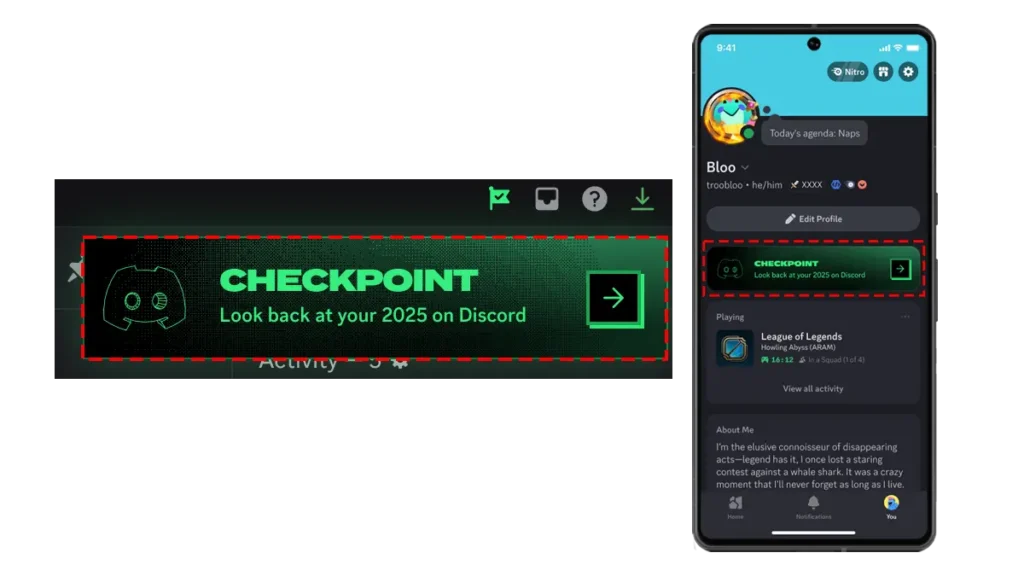
- Open Discord and tap You (your profile) in the bottom-right.
- Look for the Checkpoint banner — If present, tap it to view your recap.
- Share or save — At the end of the recap you’ll have options to share a summary to chat or keep it private.
On Desktop / Browser
- Update desktop app — Make sure your Discord desktop client is on the latest version.
- Find the flag icon — Look in the top-right corner of Discord for a small flag icon; click it to open Checkpoint.
- View & share — You’ll see your personalized stats and an option to share a short summary in chat.


Why you might not see Checkpoint — troubleshooting checklist
If you followed the steps above and still can’t se Discord Wrapped, try these fixes:
- App not up to date — Update the app; this is the most common cause.
- Personalization setting turned off — Go to Settings → Privacy & Safety (or Data & Privacy) and enable Use data to personalize my Discord experience. Checkpoint needs that data to generate your recap.
- Insufficient activity — Discord only generates summaries for accounts with enough activity; very new or inactive accounts may not get one.
- Rollout delay — Checkpoint rolled out gradually; wait 24–48 hours after the initial release if everyone else can see theirs.
- Clear cache / restart — On Android, clear Discord cache (Settings → Apps → Discord → Storage → Clear cache). Log out and back in if needed.
If none of the above work, consult Discord Support or the official Checkpoint help article.

What your Checkpoint shows (examples)
Checkpoint highlights vary, but commonly include:
- Total messages sent during 2025
- Time spent in voice channels
- Most-used emoji and GIFs
- Favorite server(s) by time spent
- Top friend or DM contact
- One of several animated checkpoint cards and an avatar decoration you can wear until mid-January 2026
These details are meant for fun and sharing — Discord gives you the option to keep your recap private.

Privacy & data notes — what Checkpoint uses and what it doesn’t
Checkpoint relies on aggregated activity data from your account. If you prefer not to have this personalized summary generated:

- Turn off Use data to personalize my Discord experience in Settings; doing so may prevent Checkpoint from appearing.
Discord’s blog and support pages explain that Checkpoint respects privacy choices and that not everyone will receive the recap based on those settings. If privacy is a concern, review Discord’s Data & Privacy settings before checking your Checkpoint.
Community reaction & coverage (quick context)
Checkpoint 2025 has generated a steady stream of posts across Reddit and social platforms — fans love collecting the avatar decorations and sharing stats, while some outlets critique another “wrapped” product in an already gamified ecosystem. Overall, Checkpoint has trended where available, and many creators are posting walkthroughs and fixes for missing Checkpoints.
Troubleshooting — common community fixes (fast)
- Try desktop if mobile fails (some users saw it first on desktop).
- Wait a day after enabling personalization — the recap generator may need time to refresh.
- If you’re an account under 13 or an account with parental restrictions, Checkpoint availability may differ. Check account age/settings. (Refer to Discord Support.)